How long does it take your organization to get around to updating an Active Directory group? According to a survey recently compiled by Imanami, a provider of group lifecycle management solutions, you’re not a slacker if it takes you nine days.
Imanami also discovered that in the organizations surveyed, two percent of the people still in Active Directory are no longer employed by the company, or 60 people in an organization of 3,000 users. Imanami surveyed IT pros involved in managing groups and other aspects of Microsoft Exchange management in organizations with at least 1,000 email users.
Based on responses, Imanami calculated that for every 1,000 users, some lucky IT pro spends about six hours per week managing groups in AD. Assuming an organization hires an IT pro at $90,000 a year and his or her job includes this task, Imanami calculates it costs $13,050 per year to manage groups in Active Directory.
“We know how much our solution costs—what surprised us was how much they're paying: one employee for every 5,000 users,” says Edward Killeen, Imanami’s director of sales and marketing. “At up to 250 employees, it's okay to manage groups manually. We usually find at 250 employees the pain starts---there are a lot of groups. Why not automate it and be done with it?”
“People aren’t aware of a solution,” Killeen says. “The good news is that you don’t have to buy ILM. ILM comes with its own nomenclature. Most product suites are ‘Frankenproducts,’ made from acquired products put together. We’re purpose built. Our customers appreciate that they can deploy this without hiring someone.”
Imanami’s conclusions, among other things are that "Group management is not the most serious problem faced by Exchange managers, but it is a serious one that presents a number of security problems.” To compare your experience to those of the IT pros surveyed, visit Imanami’s website.
Source: windowsitpro.com/article/articleid/101004/managing-groups-exchange-and-active-directory-admins-sound-off.html
Tuesday, December 30, 2008

Monday, December 22, 2008
Disable the Password for a User in Windows Server 2003 Active Directory domain
Windows Server 2003 provides security policies that ensure that all users select strong passwords. Creating a password policy involves setting the following options in the Default active directory services domain group policy object. These policies, with the exception of those settings related to password lifetime, are enforced on all users in a domain.
The default password filter (Passfilt.dll) included with Windows Server 2003 requires that a password:
Is not based on the user’s account name.
Contains at least six characters.
Contains characters from three of the following four categories:
Uppercase alphabet characters (A–Z)
Lowercase alphabet characters (a–z)
Arabic numerals (0–9)
Nonalphanumeric characters (for example, !$#,%)
Security Warning: Bare in mind that this setting can only be enabled/disabled at the domain level, and NOT on an OU level. Disabling the password requirement for an entire domain will lower your security configuration, and should only be done when absolutely necessary.
In order to disable this requirement you need to edit the Default Domain Policy for your domain.
1. Go to Administrative tools folder.
2. Double-click on the Default Domain Security Policy icon.
3. Note: If for any reason you don't see that icon you can still edit the Default Domain Group Policy from the AD Users and Computers snap-in, or from a GPMC window.
4. Navigate to Security Settings > Account Policies > Password Policy.
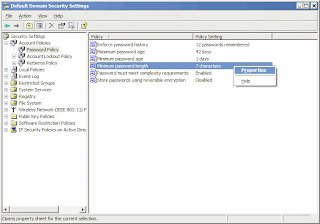
5. Right-click on the Minimum Password Length option in the right pane and select Properties.
6. Keep the V on the Define Setting selected! Do not remove the V from that check-box. Removing the V will cause the GPO to revert to the default setting, which is what we are trying to remove in the first place.
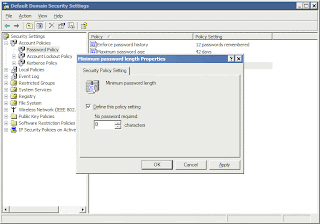
7. Enter 0 (zero) for the number of minimum characters required in a password.
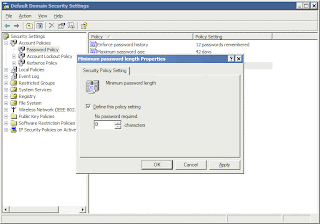
8. Now double-click on the Passwords Must Meet Complexity Requirements option in the right pane.
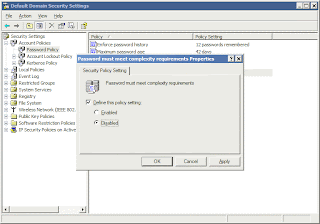
Again, do not remove the V from that check-box. Instead, select Disabled.
9. Click OK all the way out and close the GPO window.
Source: petri.co.il/disable_password_requirement_in_win2003_domain.htm
The default password filter (Passfilt.dll) included with Windows Server 2003 requires that a password:
Is not based on the user’s account name.
Contains at least six characters.
Contains characters from three of the following four categories:
Uppercase alphabet characters (A–Z)
Lowercase alphabet characters (a–z)
Arabic numerals (0–9)
Nonalphanumeric characters (for example, !$#,%)
Security Warning: Bare in mind that this setting can only be enabled/disabled at the domain level, and NOT on an OU level. Disabling the password requirement for an entire domain will lower your security configuration, and should only be done when absolutely necessary.
In order to disable this requirement you need to edit the Default Domain Policy for your domain.
1. Go to Administrative tools folder.
2. Double-click on the Default Domain Security Policy icon.
3. Note: If for any reason you don't see that icon you can still edit the Default Domain Group Policy from the AD Users and Computers snap-in, or from a GPMC window.
4. Navigate to Security Settings > Account Policies > Password Policy.

5. Right-click on the Minimum Password Length option in the right pane and select Properties.
6. Keep the V on the Define Setting selected! Do not remove the V from that check-box. Removing the V will cause the GPO to revert to the default setting, which is what we are trying to remove in the first place.

7. Enter 0 (zero) for the number of minimum characters required in a password.

8. Now double-click on the Passwords Must Meet Complexity Requirements option in the right pane.

Again, do not remove the V from that check-box. Instead, select Disabled.
9. Click OK all the way out and close the GPO window.
Source: petri.co.il/disable_password_requirement_in_win2003_domain.htm
Monday, December 15, 2008
NET's UC Gateways AddingIntegration Capabilities to MS Active Directory
NET's UC Gateways AddingIntegration Capabilities to Microsoft Active Directory to its VX Series gateways..
VoIP technologies innovator Network Equipment Technologies gave its unified communications platform a boost today by adding integration capabilities of Microsoft Active Directory (AD) and other Lightweight Directory Access Protocol solutions to its VX Series gateways.
The directory integration is designed to provide migration benefits to a converged data/voice infrastructure, such as Microsoft Office Communications Server 2007.
While the benefits of the upgrades are many, its primary function is to allow customers to leverage the directory integration features of the VX Series UC Gateway. By using information from AD, customers now have the ability to add enterprise mobility applications to the UC solution.
The applications include the use of AD or LDAP as a single point-of-administration, which is important for allowing customers to perform all moves, adds and changes in one place, according to Talbot Harty, chief development officer at NET.
"The ability to use AD to drive voice and fax functions in a converged environment saves administrators and end-users significant time and effort, while also enabling companies to implement all kinds of useful call management rules," said Harty.
In addition, the ability to flexibly define call-routing rules using AD or LDAP fields has an important function for administrators. This simplification of phased technology migrations – through identification which end-users are served by Microsoft OCS, the PBX,Cisco Manager – has significant business value, according to Harty.
"By delivering robust AD and LDAP integration in our VX Series UC Gateways, we provide customers migrating to Microsoft OCS and other UC solutions.”
NET Quintum, the wholly owned subsidiary of NET, has increased its footprint in recent months within the OCS Server 2007 community. The company has developed VoIP solutions that allow OCS 2007 to be connected to the PSTN, allowing for voice communications outside the IP network. NET Quintum Tenors make it easier to connect Microsoft Office Communications Server 2007 with a Microsoft specific configuration wizard and a wide variety of product options.
The VX Series UC Gateway's AD and LDAP support also provides advantages to resellers and integrators making it easier to install, configure and maintain convergence solutions, according to Jeff Zaremba, senior director of Collaboration Technologies at Avanade.
"Directory integration provides real value to customers by providing a consistent method for managing call routing based on Active Directory when implementing unified communications solutions such as Microsoft Office Communications Server 2007," said Zaremba. Avanade was founded in 2000 byAccenture and Microsoft Corporation.
"Additionally, it provides flexibility in migration by allowing customers to migrate over time as their business requirements dictate. For Avanade, directory integration enables us to implement more sophisticated solutions for our customers with less time, effort, and technical complexity."
More information about the VX Series UC Gateways and the application of directory integration is available at VX Gateways and Active Directory.
Source: http://unified-communications.tmcnet.com/topics/enterprise-voip/articles/47298-nets-uc-gateways-provide-integration-with-ms-active.htm
VoIP technologies innovator Network Equipment Technologies gave its unified communications platform a boost today by adding integration capabilities of Microsoft Active Directory (AD) and other Lightweight Directory Access Protocol solutions to its VX Series gateways.
The directory integration is designed to provide migration benefits to a converged data/voice infrastructure, such as Microsoft Office Communications Server 2007.
While the benefits of the upgrades are many, its primary function is to allow customers to leverage the directory integration features of the VX Series UC Gateway. By using information from AD, customers now have the ability to add enterprise mobility applications to the UC solution.
The applications include the use of AD or LDAP as a single point-of-administration, which is important for allowing customers to perform all moves, adds and changes in one place, according to Talbot Harty, chief development officer at NET.
"The ability to use AD to drive voice and fax functions in a converged environment saves administrators and end-users significant time and effort, while also enabling companies to implement all kinds of useful call management rules," said Harty.
In addition, the ability to flexibly define call-routing rules using AD or LDAP fields has an important function for administrators. This simplification of phased technology migrations – through identification which end-users are served by Microsoft OCS, the PBX,Cisco Manager – has significant business value, according to Harty.
"By delivering robust AD and LDAP integration in our VX Series UC Gateways, we provide customers migrating to Microsoft OCS and other UC solutions.”
NET Quintum, the wholly owned subsidiary of NET, has increased its footprint in recent months within the OCS Server 2007 community. The company has developed VoIP solutions that allow OCS 2007 to be connected to the PSTN, allowing for voice communications outside the IP network. NET Quintum Tenors make it easier to connect Microsoft Office Communications Server 2007 with a Microsoft specific configuration wizard and a wide variety of product options.
The VX Series UC Gateway's AD and LDAP support also provides advantages to resellers and integrators making it easier to install, configure and maintain convergence solutions, according to Jeff Zaremba, senior director of Collaboration Technologies at Avanade.
"Directory integration provides real value to customers by providing a consistent method for managing call routing based on Active Directory when implementing unified communications solutions such as Microsoft Office Communications Server 2007," said Zaremba. Avanade was founded in 2000 byAccenture and Microsoft Corporation.
"Additionally, it provides flexibility in migration by allowing customers to migrate over time as their business requirements dictate. For Avanade, directory integration enables us to implement more sophisticated solutions for our customers with less time, effort, and technical complexity."
More information about the VX Series UC Gateways and the application of directory integration is available at VX Gateways and Active Directory.
Source: http://unified-communications.tmcnet.com/topics/enterprise-voip/articles/47298-nets-uc-gateways-provide-integration-with-ms-active.htm
Friday, December 5, 2008
Microsoft's new hosted services: What are your options?
Today's announcement officially means Microsoft is the latest entry in a market of services that Microsoft actually made feasible: It can now host Exchange mailboxes for Active Directory users that do not have Exchange Server 2007.
Whether today's announcement of Microsoft-branded hosted services actually adds up to a savings for a business customer, depends on how that customer is getting or has gotten its software. Right now, the Exchange Online service can host mailboxes for as little as $10 per month per client, with a five-user minimum. That's about the industry average; other firms presently offer Exchange hosting for between $8 and $15 per month.
But Microsoft's not entering this market to simply lend its voice to the ongoing chorus. On an a la carte basis, it's also offering SharePoint Online hosting for managing a collaborative document sharing site (at $7.25 / user / month), secure instant messaging and presence with Office Communications Online (at $2.50 / user / month), and Web conferencing with Office Live Meeting, a pre-existing service (now at $4.50 / user / month).
In a very compelling alternative package, though, the company is rolling all four of these services into a single bundle called Business Productivity Online Standard Suite, for $15 per user per month. Package licensing deals are available for "midmarket" customers with between 25 and 499 users, and "enterprise" customers with 500 users and above.
Compare this against the way licensing works now. Microsoft offers Exchange Server 2007 Standard Edition for $699 up front, plus $67 for each Client Access License (CAL). So in small-quantity bundles, just the CAL could be paid for in under seven months' time, which would leave a seven-person business another seven months to break even on the up-front costs.
However, just last week, Microsoft rolled out four buildouts of Small Business Server 2008 and Essential Business Server 2008, which include Exchange Server. For the Standard Edition of SBS 2008 (which does not include SQL Server), a five-CAL package sells for $1,089, plus $77 for each additional user. SBS also includes Windows Server 2008, of course, as well as SharePoint Services 3.0, and additional extras such as Forefront Security.
Technically, Microsoft's Online hosted services do not require Windows Server. However, if your business uses networked systems and if you want to take full advantage of Exchange synchronization, you should probably have a domain controller, which means one copy of Windows Server 2008 Standard Edition. That will get you Active Directory Services (AD DS, and yes, the "D" is indeed repeated there). You could get hosted e-mail without Windows Server, in which case you'd be running Outlook 2007 through Windows XP or Vista, but most of the ActiveSync functionality that Exchange provides would be useless. The street price for Windows Server 2008 Standard is about $749, coming down a bit since the rollout of SBS and EBS 2008, and you may still need additional CALs.
Source:betanews.com/article/Microsofts_new_hosted_services_What_are_your_options/1226954182
Whether today's announcement of Microsoft-branded hosted services actually adds up to a savings for a business customer, depends on how that customer is getting or has gotten its software. Right now, the Exchange Online service can host mailboxes for as little as $10 per month per client, with a five-user minimum. That's about the industry average; other firms presently offer Exchange hosting for between $8 and $15 per month.
But Microsoft's not entering this market to simply lend its voice to the ongoing chorus. On an a la carte basis, it's also offering SharePoint Online hosting for managing a collaborative document sharing site (at $7.25 / user / month), secure instant messaging and presence with Office Communications Online (at $2.50 / user / month), and Web conferencing with Office Live Meeting, a pre-existing service (now at $4.50 / user / month).
In a very compelling alternative package, though, the company is rolling all four of these services into a single bundle called Business Productivity Online Standard Suite, for $15 per user per month. Package licensing deals are available for "midmarket" customers with between 25 and 499 users, and "enterprise" customers with 500 users and above.
Compare this against the way licensing works now. Microsoft offers Exchange Server 2007 Standard Edition for $699 up front, plus $67 for each Client Access License (CAL). So in small-quantity bundles, just the CAL could be paid for in under seven months' time, which would leave a seven-person business another seven months to break even on the up-front costs.
However, just last week, Microsoft rolled out four buildouts of Small Business Server 2008 and Essential Business Server 2008, which include Exchange Server. For the Standard Edition of SBS 2008 (which does not include SQL Server), a five-CAL package sells for $1,089, plus $77 for each additional user. SBS also includes Windows Server 2008, of course, as well as SharePoint Services 3.0, and additional extras such as Forefront Security.
Technically, Microsoft's Online hosted services do not require Windows Server. However, if your business uses networked systems and if you want to take full advantage of Exchange synchronization, you should probably have a domain controller, which means one copy of Windows Server 2008 Standard Edition. That will get you Active Directory Services (AD DS, and yes, the "D" is indeed repeated there). You could get hosted e-mail without Windows Server, in which case you'd be running Outlook 2007 through Windows XP or Vista, but most of the ActiveSync functionality that Exchange provides would be useless. The street price for Windows Server 2008 Standard is about $749, coming down a bit since the rollout of SBS and EBS 2008, and you may still need additional CALs.
Source:betanews.com/article/Microsofts_new_hosted_services_What_are_your_options/1226954182
Wednesday, November 26, 2008
Train Signal Releases New Microsoft Server 2008 Active Directory Training
Train Signal Inc., a global leader in professional computer training, is excited to announce the release of their new training course, Microsoft Windows Server 2008 Active Directory. Following the launch of this course, Train Signal will be releasing additional training courses for Windows Server 2008.
The comprehensive Windows Server 2008 Active Directory training features more than 20 hours of video instruction on two DVDs. Multiple file formats, such as iPod Video, Mp3 Audio, .WMV and .AVI, are available to make the training even more convenient. And students can print out the instructor's notes to follow along more easily and enhance the learning process.
The training package also helps students prepare for the 70-640 Configuring Windows Server 2008 Active Directory exam. It covers everything they need to know to pass the exam and includes the award-winning 70-640 practice exam software from Transcender, the world's leading exam simulation provider.
"This training package is perfect for anyone who wants to gain hands-on experience on Microsoft Server Active Directory 2008 and prepare for the 70-640 MCITP exam," said Iman Jalali, Train Signal's Director of Sales and Marketing. "We are pleased to offer this extensive package of training materials to help everyone from beginners to experienced administrators enhance their skills."
Train Signal's Windows Server 2008 Active Directory training package is designed to help students develop real skills that they can apply immediately. Key topics covered in the training include:
Source: marketwatch.com
The comprehensive Windows Server 2008 Active Directory training features more than 20 hours of video instruction on two DVDs. Multiple file formats, such as iPod Video, Mp3 Audio, .WMV and .AVI, are available to make the training even more convenient. And students can print out the instructor's notes to follow along more easily and enhance the learning process.
The training package also helps students prepare for the 70-640 Configuring Windows Server 2008 Active Directory exam. It covers everything they need to know to pass the exam and includes the award-winning 70-640 practice exam software from Transcender, the world's leading exam simulation provider.
"This training package is perfect for anyone who wants to gain hands-on experience on Microsoft Server Active Directory 2008 and prepare for the 70-640 MCITP exam," said Iman Jalali, Train Signal's Director of Sales and Marketing. "We are pleased to offer this extensive package of training materials to help everyone from beginners to experienced administrators enhance their skills."
Train Signal's Windows Server 2008 Active Directory training package is designed to help students develop real skills that they can apply immediately. Key topics covered in the training include:
- Creating Domain Controllers
- User Account Creation
- Group Policy
- Back Up and Restore/Disaster Recovery
- Read-Only Domain Controllers in Server Core
- Sharing Folders and Files
- Remote Software Installation through Group Policy
- MCITP: 70-640 Certification
Source: marketwatch.com
Thursday, November 20, 2008
How to Schedule Active Directory Snapshots in Windows Server 2008
If you’ve played around with Windows Server 2008 Active Directory Domain Services, you will probably be familiar with the snapshot feature within NTDSUTIL. The feature allows you to take snapshot of the volumes that host the AD components and to then mount the snapshot. Once mounted, you can use DSAMAIN.EXE to expose a read-only copy of the AD database to your favourite browsing tool (LDP.EXE, ADSIEDIT.MSC, DSA.MSC, ADFIND.EXE, etc.). The process for doing this is well documented elsewhere, so I don’t intend to reproduce it here.
Microsoft recommends that you schedule regular snapshots, as this provides you with a quick method of checking the contents of the directory at different time slices in the past. One advantage of this that you can quickly identify which backup to use when needing to authoritatively restore accidentally deleted AD objects from backup.
Windows Server 2008 comes with a re-vamped Task Scheduler. You can configure tasks using both the UI as well as the command line (schtasks.exe). I prefer to use the command line as it has the advantage of allowing you to set tasks to run under the SYSTEM account. It is also the only option if you are using Server Core, unless you want to open the firewall to allow remote task scheduling from a computer running the full version.
Here’s the command line I use. Note that this is all on one line (wrapped here to fit page width).
SCHTASKS /Create /RU SYSTEM /SC DAILY /TN MYTASKS\DS_SNAPSHOT /TR “%windir%\system32\ntdsutil.exe sn \”ac i ntds\” create q q” /ST 05:00
It is worth pulling the command arguments apart to explain them better
/Create - pretty obvious. It instructs schtasks to create a new task.
/RU SYSTEM - the task will run under the SYSTEM account. Note that you don’t need to specify a password when using SYSTEM.
/SC DAILY- the task will run daily
/TN MYTASKS\DS_SNAPSHOT - I’ve called the task name DS_SNAPSHOT and this will be created within the MYTASKS task folder. The folder will be created automatically if it does not already exist.
/TR “%windir%\system32\ntdsutil.exe sn \”ac i ntds\” create q q” - This is the task action. It runs NTDSUTIL with arguments. Note that the double quotation marks within the arguments have to be escaped with the backslash character
/ST 05:00 - the start time for the task will be 5am.
The command line shown above assumes that you are working on the local machine on which you want to create the task. If defining the task for a remote computer, use the additional command line options shown below.
SCHTASKS /Create /S MYSERVER /U administrator /P xxxxx /RU SYSTEM /SC DAILY /TN MYTASKS\DS_SNAPSHOT /TR “%windir%\system32\ntdsutil.exe sn \”ac i ntds\” create q q” /ST 05:00
Once you’ve run the command you can verify the settings in the Task Scheduler UI.
Source:open-a-socket.com/index.php/2008/11/20/how-to-schedule-active-directory-snapshots-in-windows-server-2008/
See Also this :-
Restarting Active Directory as a service in Windows Server 2008
Microsoft recommends that you schedule regular snapshots, as this provides you with a quick method of checking the contents of the directory at different time slices in the past. One advantage of this that you can quickly identify which backup to use when needing to authoritatively restore accidentally deleted AD objects from backup.
Windows Server 2008 comes with a re-vamped Task Scheduler. You can configure tasks using both the UI as well as the command line (schtasks.exe). I prefer to use the command line as it has the advantage of allowing you to set tasks to run under the SYSTEM account. It is also the only option if you are using Server Core, unless you want to open the firewall to allow remote task scheduling from a computer running the full version.
Here’s the command line I use. Note that this is all on one line (wrapped here to fit page width).
SCHTASKS /Create /RU SYSTEM /SC DAILY /TN MYTASKS\DS_SNAPSHOT /TR “%windir%\system32\ntdsutil.exe sn \”ac i ntds\” create q q” /ST 05:00
It is worth pulling the command arguments apart to explain them better
/Create - pretty obvious. It instructs schtasks to create a new task.
/RU SYSTEM - the task will run under the SYSTEM account. Note that you don’t need to specify a password when using SYSTEM.
/SC DAILY- the task will run daily
/TN MYTASKS\DS_SNAPSHOT - I’ve called the task name DS_SNAPSHOT and this will be created within the MYTASKS task folder. The folder will be created automatically if it does not already exist.
/TR “%windir%\system32\ntdsutil.exe sn \”ac i ntds\” create q q” - This is the task action. It runs NTDSUTIL with arguments. Note that the double quotation marks within the arguments have to be escaped with the backslash character
/ST 05:00 - the start time for the task will be 5am.
The command line shown above assumes that you are working on the local machine on which you want to create the task. If defining the task for a remote computer, use the additional command line options shown below.
SCHTASKS /Create /S MYSERVER /U administrator /P xxxxx /RU SYSTEM /SC DAILY /TN MYTASKS\DS_SNAPSHOT /TR “%windir%\system32\ntdsutil.exe sn \”ac i ntds\” create q q” /ST 05:00
Once you’ve run the command you can verify the settings in the Task Scheduler UI.
Source:open-a-socket.com/index.php/2008/11/20/how-to-schedule-active-directory-snapshots-in-windows-server-2008/
See Also this :-
Restarting Active Directory as a service in Windows Server 2008
Wednesday, November 12, 2008
Active Directory-based soln for UNIX & Linux
Centrify Corporation, a provider of Microsoft Active Directory-based auditing, access control and identity management solutions for non-Microsoft platforms, has announced Centrify DirectAuthorize, a software solution that enables organizations to increase security and compliance by controlling how users access systems and what they can do on those systems.
DirectAuthorize centrally manages and enforces role-based entitlements for fine-grained control of user access and privileges on UNIX and Linux systems. This can eliminate a user's need to use the root account or other privileged accounts, thereby allowing those accounts to be securely locked down.
DirectAuthorize is the industry's first Active Directory-based solution for UNIX and Linux privilege management and delegation of root access. Leveraging a common architecture, DirectAuthorize is seamlessly integrated with Centrify DirectControl and complements DirectControl's comprehensive Active Directory-based authentication, access control and group policy support for non-Microsoft systems and applications.
"Unlike Windows Active Directory, UNIX lacks a simple and scalable model for administrative delegation," observed Ant Allan and Jay Heiser, Research Vice Presidents in the Gartner publication, Controlling UNIX Superuser privileges is Critical. "Organizations that allow root logins to mission- critical UNIX servers run unnecessary risks."
DirectAuthorize meets compliance-driven requirements for "least access" management by allowing organizations to centrally define logical roles (e.g. backup operator, DBA, web developer, application administrator, etc.) that carry with them the specific rights needed to perform duties within a role. DirectAuthorize's role-based architecture enables the following benefits:
Like Centrify DirectControl, DirectAuthorize is tightly integrated into Active Directory, meaning no additional servers or infrastructure is required to run DirectAuthorize. DirectAuthorize stores its role and rights data securely in Active Directory Authorization Manager's existing rights-based logical model and data storage schema found in Windows 2003 and above.
This means no Active Directory schema extensions are required to install and use DirectAuthorize, and customers can leverage the pre-existing Authorization Manager (AzMan) tools and APIs to access DirectAuthorize's roles and rights data. DirectAuthorize is built on top of the DirectControl architecture, meaning the DirectAuthorize user interface is integrated with the DirectControl Administrator's Console and the DirectAuthorize rights enforcers are integrated into the DirectControl Agent. And unlike other solutions, DirectAuthorize requires no UNIX kernel changes or system reboots.
Via:ciol.com
DirectAuthorize centrally manages and enforces role-based entitlements for fine-grained control of user access and privileges on UNIX and Linux systems. This can eliminate a user's need to use the root account or other privileged accounts, thereby allowing those accounts to be securely locked down.
DirectAuthorize is the industry's first Active Directory-based solution for UNIX and Linux privilege management and delegation of root access. Leveraging a common architecture, DirectAuthorize is seamlessly integrated with Centrify DirectControl and complements DirectControl's comprehensive Active Directory-based authentication, access control and group policy support for non-Microsoft systems and applications.
"Unlike Windows Active Directory, UNIX lacks a simple and scalable model for administrative delegation," observed Ant Allan and Jay Heiser, Research Vice Presidents in the Gartner publication, Controlling UNIX Superuser privileges is Critical. "Organizations that allow root logins to mission- critical UNIX servers run unnecessary risks."
DirectAuthorize meets compliance-driven requirements for "least access" management by allowing organizations to centrally define logical roles (e.g. backup operator, DBA, web developer, application administrator, etc.) that carry with them the specific rights needed to perform duties within a role. DirectAuthorize's role-based architecture enables the following benefits:
- Simplify the execution of privileged commands --- users no longer need to switch to root or other privileged accounts
- Grant users rights to execute commands with elevated privileges, eliminating the need for access to privileged accounts and passwords
- Assign users a Restricted Environment with access only to a specific "whitelist" of commands
- Lockdown sensitive systems with fine-grained access controls that specify who can access a system and how
- Model date- and time-based access windows to match user roles
Like Centrify DirectControl, DirectAuthorize is tightly integrated into Active Directory, meaning no additional servers or infrastructure is required to run DirectAuthorize. DirectAuthorize stores its role and rights data securely in Active Directory Authorization Manager's existing rights-based logical model and data storage schema found in Windows 2003 and above.
This means no Active Directory schema extensions are required to install and use DirectAuthorize, and customers can leverage the pre-existing Authorization Manager (AzMan) tools and APIs to access DirectAuthorize's roles and rights data. DirectAuthorize is built on top of the DirectControl architecture, meaning the DirectAuthorize user interface is integrated with the DirectControl Administrator's Console and the DirectAuthorize rights enforcers are integrated into the DirectControl Agent. And unlike other solutions, DirectAuthorize requires no UNIX kernel changes or system reboots.
Via:ciol.com
Subscribe to:
Posts (Atom)


